Showing posts with label Geeks Knowledge. Show all posts

How To Get Back Deleted Whatsapp Messages/Data ?

We All are Aware of Messaging app Called Whatsapp. We Use it daily and no doubt We Love it, but have you been in a Situation when you accidently delete an important message on Whatsapp and you don’t know what to do next? 

Well, Touchscreen devices are great, but can also be frustrating. A simple tap on the wrong option, for example, and your Whatsapp chat history is gone.

Take another one, Suppose you meant to hit Add a conversation shortcut, but instead you tapped Delete chat. Then you clicked “Yes” without thinking! Your chats are gone now leaving you without a record. 


How do you get them back? Alright! There are two methods to do this:

1. Manually

2. Using Web Application


MANUALLY:


This method works because Whatsapp Creates backup of all the data each day at 4 am (system time) which is Stored in the SD card of your Android Smartphone. To get deleted Whatsapp messages just follow below simple steps:


STEP 1:  First of all Navigate to the Whatsapp database folder, the path is: File Explorer > sdcard/Whatsapp/Databases.
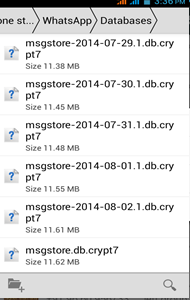
STEP 2:  In the Database folder you will see Chat files which are with names similar like msgstore-2014-01-04.1.db.crypt. You may notices the file names have dates as well but, there is a File which is msgstore.db.crypt, we need to rename it, you can add any word before msgstore.db.crypt or, rename it to “OLD”.

STEP 3: After renaming that files, now select the file which shows appropriate date before you accidently deleted your Whatsapp messages, and then rename that file to msgstore.db.crypt. This Renaming process can also be done on your PC by connecting your device.

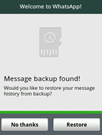
STEP 4: Go to Setting > Applications > manage applications> Whatsapp and Click on Clear Data. Now open Whatsapp, Choose Restore when it prompts. That’s it, the chat file saved as msgstore.db.crypt will be restored and hence your messages too.


STEP 5: Click on Restore instead of No Thanks.


Note: In Case if you have deleted any Image, Audio or Video from your Whatsapp chat, then don’t worry, it’s not deleted forever until you delete it. To view that image or Video all you have to do is with the help of your Preferred file Manager, Navigate to sdcard/Whatsapp/Media Where you will find folders with names Whatsapp Audio, Whatsapp images, Whatsapp video, Open them up to find the file you are looking for.


USING WEB-APPLICATION:


There is a great Web Application Called Recover Messages which is Specially Designed to Get back Deleted Whatsapp Messages. 
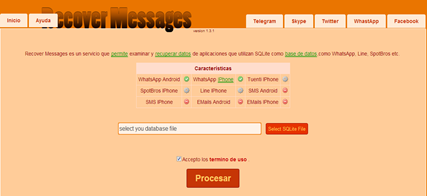


This is a Free Online Services which will help you to Read the Content of the database file and shows you Sent and Received messages.

Simply Go to Recover messages Site, Click on Select SQlite file to upload the Database file, Select the Database file from SD card, Check the box which says I accept the terms of use and click on Scan.


Just wait for few seconds while it takes a bit of time to show you the Messages. This will take few minutes to show your deleted messages. 

Note: The only drawback is you can only extract and View/Read your deleted messages but you cannot restore them to your Whatsapp chat history.

reference: https://www.whatsapp.com/faq/en/android/20887921

How do Websites like Facebook store Your password: An easy Explanation.


After making some websites I came to know a very interesting fact about which I was always clueless.

Password protected web sites do not need to store your actual password, Facebook indeed did not. For the nontechnical part of the audience, let me try to explain how this actually works.

A well designed password system uses something called a "hash function." (Hash as in hash browns, not hashish. )

Think of a hash function as a machine. It has a hopper on the top and you throw in the password, and a moment later, something completely incomprehensible called a "hash" is spit out.

For example, if you feed into the machine "p4ssw0rd", it might spit out "2a9d119d". 

Now what on earth is the point of a machine that takes a perfectly good password and spits out a bunch of garbled nonsense?

The trick is that, given the same password, it will always spit out the same garbled nonsense. If you feed in "p4ssw0rd" it always spits out "2a9d119d". If you feed in "qwerty" it always spits out "d8578edf".

And the hashing machine gets more amazing. When you give it different inputs, you are almost guaranteed to get different outputs. (The mathematicians among you may notice that for this to be true, the output should probably be longer than the input. Indeed it usually is.)

Now when somebody sets up a password, you don't just store that password on disk. You first feed it through the machine, and you store the hash. For instance, if somebody sets up "p4ssw0rd" as their password, you would store "2a9d119d".

Now when that person wants to log in, they type in "p4ssw0rd", and we need to see if that is the correct password. So we feed it through the same machine, and because the machine always spits out the same output if you give it the same input, it's going to again give us "2a9d11d". That matches the hash stored on disk so it will let the person in.

But suppose that you have forgotten the password and you call a system administrator and ask for them to look up the password in the system. You're out of luck! The only thing stored in the system is "2a9d11d", which by itself is completely useless to you.

What you would need is an unhashing machine, that takes in "2a9d11d" and gives you back "p4ssw0rd". But one of the amazing features of a good hashing machine is that it is extremely hard to build such an unhashing machine. Basically, the only way to do it is to simply feed all possible passwords into the hashing machine until "2a9d11d" comes out. But there are a lot of possible passwords, and that would take a long time.

Now where do we get this amazing hashing machine, that always produces the same output for the same input, virtually always produces different outputs for different inputs, and for which it is practically impossible to build an unhashing machine?

This is where a branch of math called cryptography comes in. Cryptography is a highly specialized branch of math that deals with creating exotic contraptions like hash functions and ciphers. Every once in a while, the cryptographers discover that for some hash function it actually isn't that hard to build the unhashing machine after all, and everybody has to scurry around and switch to using a different hash function. But by and large, it all works, even though the majority of mathematicians and computer scientists who don't specialize in cryptography don't really know how it works.

We have come to the end of my explanation of how Facebook, as well as any other decently implemented computer system, can know whether you typed the correct password on any given occasion without actually storing your password. Reality is a bit more complicated. (It always is...) There is something called password salting, for instance, that makes it a bit harder to crack passwords even if you use a common dictionary word for your password (which you should nevertheless never do). You can go read about it on Wikipedia, or in a good computer security book.

Resources to help you: 

Wikipedia has an extensive, if somewhat rambling, overview of Password security
also, an excellent list of common cryptographic hash algorithms and their known vulnerabilities
and articles about techniques such as Key stretching (where you use multiple hashes in series to increase the difficulty of reversing the hash) and Salt (which prevents the use of precomputed tables of hashes of common passwords by "hashing in" some additional information known as the "salt").

Note that all good computer security is based on multiple lines of defense; in the case of passwords, you typically want to try very hard to prevent even the hashed passwords from escaping in the first place, and rate-limit login attempts.

Thanks to Jaap Weel to make more clear.

How to automatically shutdown your windows system after a specific time?


Jesus Christ!! I have never known that it would be so easy. But now I am sharing it with you. It means it is so easy since I don't do hard. Remember??

Okay!! So, It's just one line command. Now follow my steps:

STEP 1: open run command by pressing "start+r" or just search for "run" in start menu.

STEP 2: Type shutdown -s -f -t 3600  and click ok.


Now, 3600 is number of seconds i.e. 1 hour in this case.

After 3600 seconds your system terminates all programs and automatically shuts down without prompting.

This is very useful If you're going out for more than 3-4 hrs and you want to copy a large file, process a HD video, installing a heavy game etc. which would take, assume 3-4 hours to complete and there's no one to shut it down manually after the work is done. 

When you have done with all steps, you will see a notification box like shown below.


(Don't worry about data being lost, just set few minutes more than ETA and everything will be fine).

Ohh!! I missed. You can set any number of seconds as much as you want for whole days or for whole life. 

If you find difficult to find number of seconds in 'n' hours, just type "calc" in run window which opens a calculator, you use it to find out multiples of 3600, ex: 7*3600 for 7hrs which is 25200, so "shutdown -s -f -t 25200" for 7hrs.

Note:  If you want to cancel the scheduled shut down, type "shutdown -a" in run window. 

That's it for today. Now, take a Nap.

How To Make your Computer Talk ?? Serious Experiment.

Indeed. You can also make your computer speak whatever you input to it.


Wait!! NO its Okay!!!

To create one such talk script, follow the steps given below:-

Steps 1Open Notepad.
Step 2: Copy and paste the exact code given below.

          Dim Message, Speak
          Message=InputBox("Enter text for Abhishek Raj","Speak")
          Set Speak=CreateObject("sapi.spvoice")
          Speak.Speak Message

Step 3. Click on File Menu, Save As, select All Types in Save as Type option, and save the file as Speak.vbs.

Note 1: Remember you can use anyname instead of Speak but ".vbs" is necessary.

Step 4.  Double click on the saved file, a window will open like the one in the image. Enter some text in enter text column and click OK.


Now your Computer will speak / talk whatever you would type in Step 4.

Warning: Please go to sleep after performing this experiment. Otherwise you will get headache. :P

Make a Disco: Cool Keyboard Tricks for Windows


This trick uses a simple Visual Basic Script which when activated makes your Scroll lock, Caps lock and Num lock LEDs flash in a cool rhythmic way which gives the perception of a live disco on your keyboard.

To make your own live disco, follow the steps given below:-

Step 1. Open Notepad.
Step 2. Copy paste the exact code given below:-

Set wshShell =wscript.CreateObject("WScript.Shell")
do
wscript.sleep 100
wshshell.sendkeys "{CAPSLOCK}"
wshshell.sendkeys "{NUMLOCK}"
wshshell.sendkeys "{SCROLLLOCK}"
loop

Step 3. Save the file as disco.vbs . That's it. :)

Note 1: Remember you can use anyname instead of disco but ".vbs" is necessary.

Double click on the Saved file to see the LED lights on your keyboard. Your keyboard go crazy and made its own cool disco.

I have tested this trick on Windows XP and Windows 7. But It should work on Windows Vista as well as on Windows 8.

Note 2: You can disable the keyboard disco by starting Task Manager and ending the wscript.exe process. (i.e. Task Manager -> processes-> wscript.exe-> End Process).


Warning: Get Sleep after performing this experiment otherwise you'll get headache. :P

Had an assignment and you haven't completed it yet?

Don't worry guys this trick give you instant relief and Works if it's a soft copy (a Word, a PowerPoint Presentation and their likes). 

instead of talking this-that blah blah...  let's see the solution step by step and how its works!


Here's the solution.


Step 1. If you really screwed up and still haven't started, follow this step, or start from Step 2.


-Create a Word File/ PowerPoint Presentation and type something. It's important that you type in something, or this won't work.


Step 2. Create a Back-up of the original file. (Just copy-paste the file).


Step 3. Open Notepad.


Step 4. Go To File>Open in Notepad.


Step 5. Select "All Files" where it says "Text Documents" as shown below.


Step 6. Select your Original File and click Open. It should look something like this:


Step 7. Remove some random lines from this file.


Step 8. Save the file. Not "Save As", just Save. This will retain the .docx extension


Step 9. Submit this file while continuing to work on the backup.


The professor will try and open your assignment and find this: 


Say something's wrong with the file and ask him for a day's time and submit the assignment the next day.


Step 10. Breathe a sigh of relief.


You're Welcome!

Learn an unusual Trick and hack your Past Life in 3 second

This only takes 3 seconds to do everyday, but you will love it!

Step 1: Take out your phone from your pocket.
Step 2: Record a short clip of what's in front of you.
Step 3: Repeat everyday.


Step 4: Snip 1 second out of each clip and stitch them together.

At the end of every year you will be watching a 6-minute video of the super-condensed version of your annual life. 

Time machine doesn't exist but this is the next best thing. With each second playing, you travel back in time to that day when you were younger and making your mark in the world. 

You will remember that sexy date you had on the beach, that boring day  when you had nothing better to do than to eat a pack of instant noodle,  or just how beautiful the rainbow was after the rain. 

Everything.  Vividly.

here is a video of my friend who shared it to me.I also started in december after getting the idea from this TED Talk One second every day):


It's  amazing the amount of information 1 second clips can contain. I don't know how it looks like to you, but to me I could almost physically see myself standing holding my phone and remember the whole day. From just that 1 second. Reminiscing has never been this easy and sure as hell I'm going to do this for the rest of my life.

Some people take pictures, but pictures only engage your vision sense. Videos, on the other hand, convey the human movements, the sounds of birds chirping, etc and hence are much more memorable. 

In 30 years you will be watching your whole life flashing back to you in a beautiful 3-hour video. Can you imagine what an awesome digital trip would that be? 

Time is the only dimension that human beings haven't been able to manipulate, but with this you can revisit all the good and bad times you had without actually bending physics.

Just a few tips if you are going to do this:
1. Take landscape clips, not potrait.
2. Don't worry if you don't know how to edit videos, just take the videos first and learn how to edit them later. I only learned how to use Adobe Premiere after I had some of my 2013 clips. It took me 1 hour to learn from Youtube videos and 2 hours of actual editing. It will only get faster!
3. Record 4-5 seconds of multiple events in a day if you want, so you can choose which clips you want to include at the end of the year.

Enjoy!


A little LifeHack part 1


I'm not going to give you the usual lifehack stuff. Sure, using Evernote, sleeping a lot, learning to listen, being grateful, all works for many people. 

I don't like the word "lifehack". It takes a lot of work to be really good at something in life. To get good at something you need: a teacher, a passion, to read a lot of books, to practice 3-4 hours a day for many days. 

There are shortcuts to learning something. But if you follow the last paragraph, you will learn those shortcuts and it will still take you a long time. 

Here's the rule of thumb of hacking anything in life BUT then, that all said, I will give you my four favorite lifehacks: 

It will take you 1 year of serious study to be in the top 60% of anything in life. 
It will take you 2 years to be in the top 50% (the learning curve slope starts to flatten)
It will take you 3 years to be in the top 30% (where you will start making money at your passion)
It will take you 4 years to be in the top 10-20% (where you will start to make real wealth)
It will take you 5+ years to be in the top 10% where you will make real wealth. I've switched careers many times. Even if you have every lifehack in the book, this is what it takes to be GREAT at something you love doing. Great enough to make a living or even wealth at it. 

This is true no matter what field. And by serious study I mean 3-4 hours a day with breaks in between. 

So instead, I'm going to tell you some other lifehacks I do that I have fun with and has made life A LOT smoother for me. 

FOUR LIFEHACKS THAT WORK FOR ME

- $2 bills. I have thousands of $2 bills. I always tip with $2 bills. How come? Because then people remember me. They always say, "whoah! I've never had one." 

And then the next time I come into an establishment, I'm remembered. This is good for restaurants, dates, poker night with friends, even for paying at the local deli. 

I also find whenever I move to a new town this is a quick way to make friends. I'm very shy and this gets people talking. This has been also very good on dates. Nobody ever forgets the guy with a roll of $2 bills. 

- Doctor's coat. I wear a doctor's lab coat most of the time. Like in airports, restaurants, walking around town. 

The reason? 
   a. It's comfortable. 
   b. The big pockets let me put any electronic devices I might need (an ipad mini, for example, plus waiter's pads (see below))
   c. People actually do treat me like a doctor. If someone said, "I need a doctor" I would not be able to help (unless it's easy stuff in which case I can say, "I'm not a doctor" and then perform CPR or mouth-to-mouth or Heimlich, which are all easy to learn. 
 
   But the reality is, people move out of the way if you are an airport and walking around in a doctor's coat? 

Is this unfair? Well, I never claim to be a doctor. I'm just wearing a doctor's coat because I like how it feels, looks, and the functionality of it. But if it has other benefits, which it does, I'll take it. 

- Waiter's pads. I have about 300 waiter's pads. I order them for about 10 cents a pad in bulk on restaurant supplies website. 

How come? 
   a. I like to write ideas on pads. I write down at least 10 ideas a day. The idea muscle is a muscle like any other. If it's not exercised, it atrophies. If it's exercised then within six months you're an idea machine. Try it. It's amazing what happens. Don't keep track of the ideas. Just become an idea machine. 
  b. Why a pad? A screen messes with your dopamine levels. I like the visceralexperience of putting pen to pad. 
  c. Why ten ideas? Four or five ideas on any theme is easy. It's the final five or six that makes the brain sweat. This is how you exercise the idea muscle. 
  d. Why specifically a waiter's pad? 
       i. It forces you to be concise. A waiter's pad is small lines. You can't write a novel there. 
      ii. It's a great conversation piece in meetings. Once I pull out the waiter's pad someone always says, "I'll take fries with my burger" and everyone laughs. Again, I'm shy so it's a good way for me to break the ice. 
     iii. In restaurants, when you pull out a waiter's pad, guess what? Waiters treat you better. 
    iv. The other day in a cafe I was working and someone potentially violent came up and asked me for money. I held up my waiter's pad and said, "I'm a waiter, do you want to order something?" and they sort of looked at me and grunted and then walked away. 

- Watch standup comedy before every meeting, date, dinner, media appearance, conversation, public talk. 

  I watch Louis CK, Daniel Tosh, Anthony Jeselnik, Jim Norton, Andy Samberg, Seth Rogen, Marina Franklin, Ellen, Bo Burnham, and maybe a dozen others. 

How come? 

  I have a lot of inhibitions when I meet people. I'm scared and somewhat introverted. Standup comedians are the best public speakers in the world and I think they are the most astute social commentators on the human condition. 

So the reasons I watch them before most social encounters (personal, professional, media)

  - it gives me a boost of energy. My "mirror neurons" are going to feed off of their boost of energy for at least 1-3 hours after I watch them. 
  - it gives me material. I won't steal from a comedian. But the reality is: good artists plagiarize, great artists steal. And at the very least, I often improvise based on material I heard a comedian said. I'm not competing with them. I'm just on a date. Or a business meeeting. 
  - Studying the subtleties of how comedians get laughs: their timing, their voices, their silences, the way they look at the audience, the way they move across the stage, the way they benefits from the comedians who came before them, AND their actual commentary about life, helps me in my many interactions with people. 

All of the above may make it seem like I'm a loser in many respects. I don't deny this. That's why I need lifehacks. 

And they work.


shared by: James Altucher

Some unusual Tips and Trick for Facebook and YouTube geeks

1. To skip the You tube's "Signin to confirm your age" message like on video 


Just Change the url from 
http://www.youtube.com/watch?v=Ci6lMQNLKZU
to
http://www.youtube.com/v/Ci6lMQNLKZU

or
http://www.nsfwyoutube.com/watch?v=Ci6lMQNLKZU

No reason to having to sign in to watch every 3rd video on Youtube.


  • Replace "youtube" with "listentoyoutube" in the URL to download the audio of the video.
  • Replace "youtube" with "ssyoutube" in the URL to download the video in any quality available.
  • Replace "youtube" with "listenonrepeat" in the URL to repeat the video automatically .
  • Replace "youtube" with "youtubeskip" in the URL and you won't see ads.

2. How to view youtube and other online videos in VLC player (on any OS) as well as how to download that video.

This has many advantages
1.watching it on full screen
2.vlc watching experience
3.You can download it and that too without the help of any other browser extension or software.

Steps:-


  1. First of all go to the YouTube video page which you want to download. 
  2. Now open your VLC player. Click on Media-->Open Network stream. 
  3. Paste the URL of the YouTube video page and click Play. Once VLC starts streaming the video.

To download the video,click Tools-->Codec Information and at the bottom of the window you will see a Location box. Copy the URL and paste it on your browser’s address bar. Now download will start.

Best part is, it has nothing to do with what Operating System you are using and what Browser you are using. Works well with any OS and any browser.


You also can change the quality of video streaming.
Tools -> Preferences -> Change radio button settings from Simple to All -> Inputs/Codecs -> Preferred Video Resolution.


3. You can navigate through Facebook news feed using only your keyboard.
There are lots of shortcuts for those who like to use keyboard more than mouse.

List of facebook shortcut keys:-
You can press these buttons on your keyboard to use Facebook faster.


  • j , k — Scroll between News Feed stories
  • p — Post a new status
  • l — Like or unlike the selected story
  • c — Comment on the selected story
  • s — Share the selected story
  • o — Open attachment of the selected story

  • / — Search
  • q — Search chat contacts


  • Ctrl + Alt + 0 — Help
  • Ctrl + Alt + 1 — Home
  • Ctrl + Alt + 2 — Timeline
  • Ctrl + Alt + 3 — Friends
  • Ctrl + Alt + 4 — Inbox
  • Ctrl + Alt + 5 — Notifications
  • Ctrl + Alt + 6 — Settings
  • Ctrl + Alt + 7 — Activity Log
  • Ctrl + Alt + 8 — About
  • Ctrl + Alt + 9 — Terms
  • Ctrl + Alt + m — New Message


you can also type  ?  to Show help dialog box

enjoy!!

How to undo a mail sent in Gmail

hey guys, i think most of us don't know how to undo a mail sent in Gmail . 

So, today after following these steps you can easily enable that option.

1. Click the gear icon in the top right corner of your Gmail window and select Settings from the dropdown menu.


2. Select Labs from the row of tabs.


3. Scroll all the way to the bottom where you see Undo Send and click Enable.


4. Hit Save Changes at the bottom.

5. Now when you send an email, the yellow dialogue that displays "Your message has been sent" will also give you the option to Undo.


6. Just by clicking on that button you can undo your message.


Search Anything from This Blog or Web

Web hosting